Software Migrations: A Complete 2026 Guide to Planning, Risks, and Successful Implementation
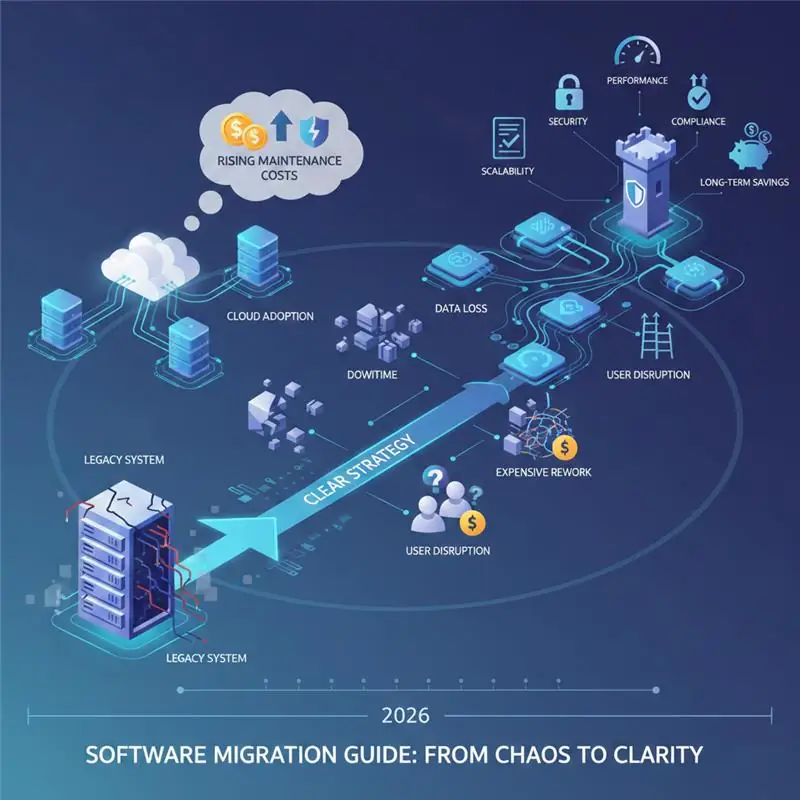
Software migrations isn't just some "tech upgrade" anymore. In 2026, it's a major business decision that impacts everything—your performance, security, how much you can scale, staying compliant with regulations, and what you'll end up spending long-term to keep things running.
But even though it's so important, software migration is still one of the most misunderstood things companies do—and honestly, one of the worst executed too.
Many companies rush into migration because:
- their software development services feels slow
- vendors push cloud adoption
- maintenance costs are rising
- or security risks are increasing
But without a clear strategy, software migration often leads to downtime, data loss, user disruption, and expensive rework. This guide breaks down software migration the way real teams handle it in practice — not just throwing around technical terms, but following a clear, careful process that keeps your business running smoothly throughout the transition.
What Is Software Migrations (In Practical Terms)?
Software migration is the process of moving an application, system, or data from one environment to another while preserving functionality, data integrity, and user experience.
In real projects, this can involve:
- moving legacy systems to modern platforms
- shifting from on-premise infrastructure to the cloud
- upgrading databases or frameworks
- re-architecting applications for scalability
- replacing outdated software with newer solutions
A critical distinction many people miss: Software migration is not just “moving software.” It is changing the foundation on which your business systems operate.
Why Software Migrations Are Increasing in 2026
Organizations are migrating software now more than ever due to several converging factors:
1. Legacy Systems Are Becoming a Liability
Older systems:
- are expensive to maintain
- lack vendor support
- struggle with security updates
- cannot scale with modern usage
At some point, maintaining legacy software costs more than replacing it.
2. Cloud and Scalability Requirements
Modern businesses require:
- elastic infrastructure
- high availability
- global access
- faster deployments
Traditional systems were never designed for this reality.
3. Security and Compliance Pressure
Rules around data protection and security are getting tougher every year. Old systems just can't keep up with today's compliance standards, which means switching to something new isn't really optional anymore.
4. Integration Demands
Today’s software must integrate with:
- analytics platforms
- CRM systems
- third-party APIs
- automation tools
Older systems were built in isolation, not ecosystems.
Common Types of Software Migrations
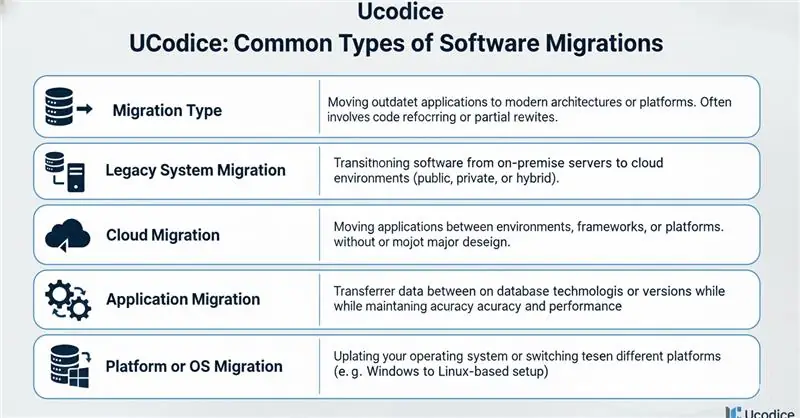
Understanding the type of migration is essential because risks and strategies differ significantly.
- 1. Legacy System Migration: Moving outdated applications to modern architectures or platforms. This often involves code refactoring or partial rewrites.
- 2. Cloud Migration Transitioning software from on-premise servers to cloud environments (public, private, or hybrid).
- 3. Application Migration: Moving applications between environments, frameworks, or platforms without major redesign.
- 4. Database Migration: Transferring data between database technologies or versions while maintaining accuracy and performance.
- 5. Platform or OS Migration: Updating your operating system or switching between different platforms (like going from Windows to a Linux-based setup).
Each type needs its own approach when it comes to planning, testing, and having a backup plan if things go wrong.
Benefits of Software Migration (When Done Right)
When executed properly, software migration delivers measurable business value:
- Improved Performance and Reliability: Modern systems are faster, more stable, and better optimized for current workloads.
- Reduced Long-Term Costs: Lower infrastructure maintenance, fewer emergency fixes, and improved operational efficiency.
- Enhanced Security: Modern platforms support updated encryption, access control, and monitoring.
- Better Scalability: Systems can handle growth without constant architectural changes.
- Future-Readiness: Easier updates, integrations, and feature expansion.
The Real Risks of Software Migration (What Most People Downplay)
This is where most migration projects fail — not because migration is bad, but because risk is underestimated.
- Data Loss or Corruption: Poor data mapping and validation can permanently damage business data.
- Extended Downtime: Improper cut-over planning leads to service interruptions that impact customers and revenue.
- Compatibility Issues: Legacy code may not behave the same way in new environments.
- Hidden Dependencies: Older systems often rely on undocumented processes or integrations that surface only during migration.
- User Disruption: Even technically successful migrations can fail if users are not prepared or workflows change unexpectedly.
These aren't just hypothetical problems — they're real issues that happen all the time when projects are rushed.
Software Migration Planning: The Most Critical Phase
Successful migration is 80% planning, 20% execution.
Step 1: System Audit and Discovery
Before any move:
- inventory applications, data, and dependencies
- identify business-critical components
- understand current performance and bottlenecks
Skipping this step guarantees surprises later.
Step 2: Define Migration Goals
Migration must have clear objectives:
- performance improvement?
- cost reduction?
- security compliance?
- scalability?
Vague goals lead to vague outcomes.
Step 3: Choose the Right Migration Strategy
Common approaches include:
- Phased migration: (safer approach, but takes more time)
- Parallel run: (high safety, higher cost)
- Big-bang migration: (fast, high risk)
The right choice depends on business tolerance for downtime and risk.
Step 4: Risk Assessment and Rollback Planning
Every migration plan must answer:
- What do we do if something breaks?
- How fast can we roll things back?
- Do we have our data backed up?
No rollback plan = unacceptable risk.
Software Migration Implementation Phases
Once planning is complete, execution follows structured phases.
Phase 1: Environment Setup
- infrastructure provisioning
- security configuration
- access control setup
Phase 2: Data Preparation
- data cleansing
- mapping and transformation
- test migrations
Phase 3: Application Refactoring (If Needed)
- updating code for compatibility
- removing deprecated components
- improving performance bottlenecks
Phase 4: Testing
Testing must include:
- functional testing
- performance testing
- security testing
- user acceptance testing
Testing is not optional — it is risk insurance.
Phase 5: Cut-Over and Deployment
- planned switch
- monitoring
- rapid issue resolution
Phase 6: Post-Migration Monitoring
- system health checks
- performance benchmarking
- user feedback tracking
Migration success is confirmed after, not during, deployment.
Tools and Technologies Used in Software Migrations
Modern migration projects often rely on:
- cloud platforms (AWS, Azure, GCP)
- data replication and synchronization tools
- containerization and orchestration
- CI/CD pipelines
- monitoring and logging systems
Tools can help with migration, but they can't do the strategic thinking for you.
Measuring Software Migration Success
A migration only counts as successful if it actually delivers real results. Key metrics include:
- system uptime
- performance benchmarks
- error rates
- user adoption
- operational cost comparison
- security incident reduction
If these numbers don't get better, then the migration didn't really do what it was supposed to.
How to Choose the Right Software Migration Partner
If you’re working with a migration service provider, evaluate carefully.
Ask These Questions:
- How do you assess migration risk?
- What is your rollback strategy?
- How do you handle downtime?
- How do you validate data integrity?
- What post-migration support do you provide?
Red Flags to Avoid:
- vague timelines
- no testing strategy
- unrealistic guarantees
- lack of documentation
- no post-migration ownership
Migration partners need to think like people managing risks, not just coders building features.
Common Software Migration Mistakes to Avoid
- treating migration as a simple upgrade
- skipping documentation
- ignoring user training
- underestimating testing
- choosing speed over stability
These mistakes just carry over old problems into your new system, which kind of defeats the whole point of migrating in the first place.
When Software Migration Is the Right Decision — and When It’s Not
Migration makes sense when:
- legacy systems block growth
- security risks are unacceptable
- maintenance costs exceed value
- scalability is required
Migration may not be ideal when:
- systems are stable and well-supported
- business disruption risk is too high
- ROI is unclear
Migration should be a planned strategic move, not something you do because you're forced to react.
Final Thoughts: Software Migration Is a Business Transformation
Software migration isn't about chasing the latest tech trends. It's really about protecting your business and setting it up to grow in the next phase.
When you plan it right, migration:
- cuts down on risk
- boosts performance
- opens the door for innovation
But when you rush it, migration can turn into one of the costiest mistakes your company will ever make. The difference between success and disaster comes down to good planning, real experience, and sticking to disciplined execution.
FAQ: Software Migrations
What is software migration?
Software migration is when you move your applications, systems, or data from one setup to another—like switching from outdated systems to newer platforms, or shifting from your own servers to the cloud—all while making sure everything stays stable, secure, and doesn't mess up your day-to-day operations.
What are the biggest risks involved in software migration?
The biggest risks when migrating software are losing data, dealing with long periods of downtime, running into compatibility problems with old code, discovering hidden connections between systems, and disrupting your users. These problems tend to get worse when you rush the migration or don't plan it out properly.
When is the right time to plan a software migration?
The right time to migrate your software is when your old systems are holding back growth, security risks are becoming too big to ignore, you're spending more on maintenance than the system is worth, or you need to scale up. Migration should be a deliberate strategic choice based on where your business is heading long-term, not something you do in a panic when things break.