In this article
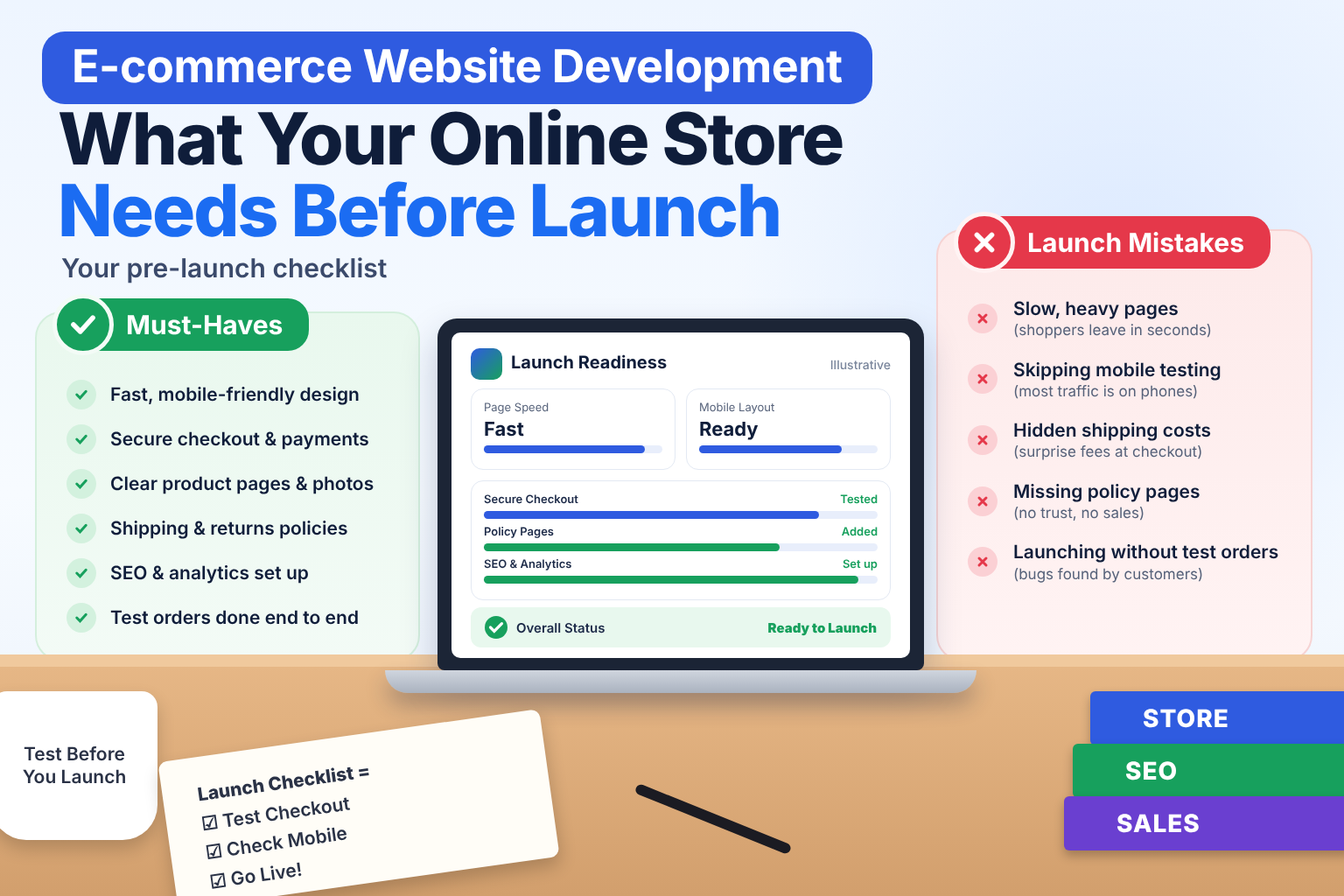
Putting products online is the easy part. Building a store that visitors trust, that works on a phone and that actually turns browsers into buyers takes more planning. This checklist covers what to decide before you launch, written for business owners rather than developers.
Key takeaways
- Choose the platform from your needs: a hosted platform suits most new stores, custom suits unusual requirements.
- Checkout is where most stores lose buyers: allow guest checkout, show total cost early and test on a phone.
- Offer the payment methods Indian customers use, such as UPI, cards, net banking and, where it suits, cash on delivery.
- Place a real test order with every payment method before launch, and set up purchase tracking.
Step 1: Choose the right platform
There is no single best platform. The right choice depends on your products, budget and plans.
- Hosted platforms (such as Shopify). Faster to launch, with hosting, security updates and checkout handled for you. Good for most new stores. You pay a monthly fee and have some limits on deep customization.
- WordPress with WooCommerce. Flexible and familiar, and a good fit if you already run a WordPress site. It needs more maintenance and careful hosting.
- Custom-built stores. Best when you have unusual requirements, such as complex pricing, marketplace features or deep integration with your own systems. They take longer and cost more.
If you are unsure, start by listing what your store must do that a standard platform cannot. If the list is short, a standard platform is usually the better start.
Step 2: Plan the features that matter
Customers expect a basic set of things. Missing any of them costs sales.
Product pages
- Clear photos from several angles, loading quickly
- A plain, specific description (size, material, what is in the box)
- Price, availability and delivery time visible without searching
- Reviews or ratings once you have them
- A visible "Add to cart" button on mobile without scrolling
Search, filters and navigation
If you sell more than a handful of products, shoppers need search and filters (size, price, category). Most visitors who cannot find a product quickly leave.
Cart and checkout
This is where most stores lose buyers. Keep it short:
- Allow guest checkout. Forcing account creation drives people away.
- Ask only for what you need.
- Show total cost, including shipping and taxes, before the final step.
- Make the checkout work smoothly on a phone.
Payments
For Indian customers, offer the methods people actually use:
- UPI
- Debit and credit cards
- Net banking and wallets
- Cash on delivery, if it suits your products and margins
Use a recognized payment gateway so card details are handled securely and not stored on your own server.
Shipping and delivery
- Connect to the couriers you will actually use
- Show delivery estimates by PIN code where possible
- Send order, shipping and delivery updates by email or SMS
- Decide your returns and refund policy and publish it clearly
Accounts and admin
- Order history for customers
- An admin area where you can add products, update stock, manage orders and issue refunds without a developer
Step 3: Make it fast and mobile-first
Most shoppers browse on phones. Test every page on a real phone, not just a resized desktop window. Compress product images, avoid heavy plugins and check that pages load quickly on a normal mobile connection. Speed affects both sales and search rankings.
Step 4: Build trust
Shoppers abandon stores that feel unsafe. Show:
- A secure connection (HTTPS) on every page
- Real contact details, including a phone number and address
- Clear return, refund and shipping policies
- Privacy policy and terms pages
- Genuine reviews, not invented ones
Step 5: Build SEO in from the start
It is much easier to set up search-friendly structure while building than to fix it later.
- Give each product and category its own clean URL
- Write unique titles and descriptions, not copied supplier text
- Add product details in a way search engines can read
- Make sure filters do not create thousands of near-duplicate pages
- Submit a sitemap after launch
Step 6: Set up tracking before you launch
You need to know what is working. Set up analytics and conversion tracking for purchases, add-to-cart and checkout steps. Without this, you cannot find where buyers drop out.
Step 7: Security and backups
- Keep the platform and plugins updated
- Use strong admin passwords and limit who has access
- Schedule regular backups and know how to restore them
- Check that your payment flow is handled by the gateway, not stored by you
Pre-launch checklist
- Place a real test order end to end, using each payment method
- Test on at least two phones and two browsers
- Check that emails and SMS for orders arrive
- Confirm taxes and shipping charges calculate correctly
- Review every policy page
- Confirm analytics and conversion tracking record a test purchase
- Check page speed on mobile
- Make sure the site is open to search engines (remove any staging block)
- Set up backups
Questions to ask your development team
- Which platform do you recommend for my products, and why?
- What will I be able to manage myself in the admin?
- Which payment gateways and couriers can you connect?
- Who handles updates, security and backups after launch?
- How will I be charged for changes later?
Common mistakes new online stores make
Most new stores stumble on the same few things:
- Too many products at launch with poor descriptions. A smaller catalogue with good photos and clear details usually sells better than a large one with thin pages.
- A complicated checkout. Every extra field or forced account creation costs sales.
- Copied supplier text. Identical descriptions used by many sellers give search engines little reason to rank your page.
- Unclear delivery and return terms. Buyers hesitate when they cannot tell how long delivery takes or how returns work.
- Ignoring mobile. A store that looks good on a laptop but is awkward on a phone loses most of its visitors.
- No plan after launch. A store needs fresh products, updated stock, customer support and marketing to keep growing.
Costs to plan for after launch
The build is only part of the cost of running a store. Plan for:
- Hosting or the monthly platform fee
- Payment gateway charges on each transaction
- Domain, security certificate and any paid plugins or apps
- Maintenance, security updates and backups
- Product photography and content
- Marketing, such as SEO, social media and ads
Ask your development team for a clear list of ongoing costs, so there are no surprises after the first month.
How Ucodice can help
We design, build and market e-commerce sites with one team, from the store itself to SEO and ongoing support. If you are planning a store, tell us what you sell and we will suggest the simplest setup that fits your goals and budget. See our web development services or read how we supported the Stuffmybags launch in our case study.
Frequently asked questions
Which platform is best for an online store in India?
There is no single best platform. Hosted platforms such as Shopify suit most new stores, WooCommerce suits teams already on WordPress, and a custom build suits unusual requirements. Start from what your store must do.
Which payment methods should an Indian online store offer?
UPI, debit and credit cards, net banking and wallets are common. Cash on delivery can help for some products, but check how it affects returns and margins.
Do I need a mobile app for my online store?
Not at the start. A fast, mobile-friendly website is usually the better first step. Consider an app once you have repeat customers.
How do I keep my store secure?
Use HTTPS, keep the platform and plugins updated, use strong admin passwords, take regular backups and let a recognized payment gateway handle card details.