In this article
Adding AI to a mobile app has become a checkbox on many wish lists. But a feature is worth adding only if it helps your users do something faster, easier or better, and if its running cost and risks make sense. This guide goes through the AI features that most often earn their place in an app, how to pick between them and what to skip.
Key takeaways
- Choose AI features by the user problem they solve, not by what is fashionable.
- Chat assistants, smart search, recommendations, camera features and voice input are the most proven starting points.
- Decide early whether a feature runs on the phone or in the cloud, because it affects privacy, speed and cost.
- Plan for usage fees, accuracy review and privacy, and start with one feature.
A simple test for every AI feature idea
Before adding any AI feature to an app, ask four questions:
- Which user problem does it solve, and how will we measure that?
- Could a simple rule or a better screen solve it just as well?
- What happens when the AI is wrong, and can a person correct it easily?
- What will it cost to run for every active user each month?
If you cannot answer the first question clearly, wait. Our guide on AI vs traditional software development explains when a plain rule is the better answer.
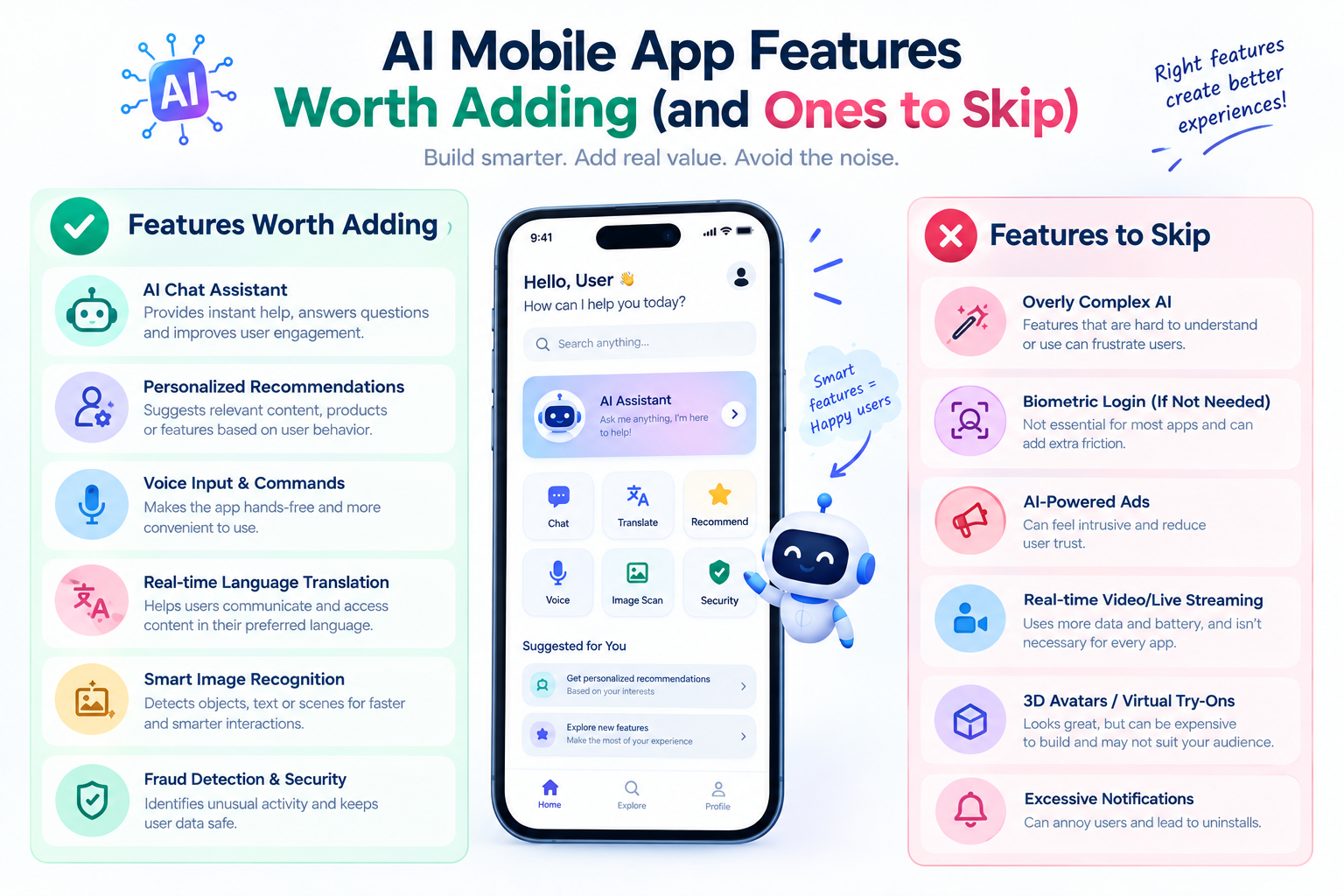
AI features that usually earn their place
1. A chat assistant inside the app
An assistant that answers questions about the product, the user's account or the content of the app can reduce support load and help new users get started. It works best when it answers only from approved content and can hand over to a person. See our AI chatbot guide for how to plan one.
2. Smart search
Search that understands meaning, not only exact words, helps in apps with large catalogues, many articles or lots of documents. A user who types "warm jacket for light rain" should see relevant products even if those words are not in the listing.
3. Personalized recommendations
Suggesting items, content or next steps based on what a user has viewed or bought can raise engagement. It needs enough usage data to be useful, so it suits apps with an active user base and a catalogue worth browsing. For small apps, simple rules such as "recently viewed" or "popular this week" often work well.
4. Camera and image features
Scanning a document, reading a card or barcode, recognizing a product or checking an image are natural fits for a phone. Text recognition can fill forms from a photo of a document, which removes typing and mistakes.
5. Voice input and transcription
Speaking is faster than typing on a small screen. Voice search, dictation and transcribed notes help users in motion, such as drivers, field staff or anyone using the app one-handed. Test with the accents and languages your users actually speak.
6. Smart notifications
Choosing the best time, or the most relevant message, for a notification can improve engagement while reducing the number of alerts users receive. The goal is fewer, better notifications, not more of them.
7. Summaries and drafting help
Summarizing a long thread, a report or a set of reviews, or drafting a reply for the user to edit, saves time. Always let the user review the text before it is sent or saved.
On the phone or in the cloud?
AI features can run in two places, and the choice shapes the whole feature.
| On the phone (on-device) | In the cloud | |
|---|---|---|
| Privacy | Data stays on the device | Data is sent to a server or AI service |
| Speed | Fast, with no network round trip | Depends on the connection |
| Works offline | Yes | No |
| Capability | Limited to smaller, simpler models | Can use the most capable models |
| App size and battery | Larger app, more battery use | Smaller app, less battery use |
| Running cost | Mostly none per use | Usage fees per request |
Simple tasks, such as reading text from a photo or recognizing a spoken command, can often run on the device. Open-ended language tasks, such as answering questions or writing summaries, usually run in the cloud. Many apps use both.
Features that match common app types
| App type | AI features that often fit |
|---|---|
| Online store | Smart search, recommendations, image search, a shopping assistant |
| Health and fitness | Personalized plans, food or exercise logging with the camera, summaries of progress, with great care over health claims |
| Field service and logistics | Voice notes, document scanning, route and schedule suggestions |
| Content and learning | Smart search, summaries, personalized reading or study paths |
| Finance | Receipt scanning, spending insights, unusual activity alerts, with strong security and clear user control |
| Service and booking | Assistant for questions and booking, smart reminders |
These are starting points, not a shopping list. Pick one that solves your users' biggest problem and prove it before adding another.
Privacy, permissions and trust
- Ask only for the permissions a feature truly needs, such as the camera or microphone, and explain why at the moment you ask.
- Tell users when they are talking to an AI, and how their data is used.
- Be accurate in the data-use information you give the Google Play and Apple App Store listings.
- Do not send sensitive personal data to a service that does not need it.
- Let users correct, delete and opt out where possible.
- Check how any AI provider you use stores and uses the data you send.
Our guide on the risks, rewards and costs of AI mobile apps goes further into privacy and accuracy.
An example: a delivery app
This is an illustrative scenario, not a client project. Imagine an app for a local delivery business. The team lists AI ideas, then applies the test from the start of this guide.
- A chat assistant to answer delivery status questions: worth it, because support receives the same question all day and the answers come from order data.
- Voice input for drivers to log a delivery problem hands-free: worth it, because drivers cannot type while driving or carrying parcels.
- Photo scanning of a parcel label to fill the delivery form: worth it, because it removes typing and mistakes.
- Personalized product recommendations: not yet, because there is too little browsing data and the app is mostly used for tracking.
- A general-purpose AI writing tool: skip, because it is unrelated to the user's main task.
Three of the five ideas are kept and two are not. That outcome is typical. A short, honest filter protects your budget and keeps the app focused on what users came to do.
The running cost of AI in an app
An AI feature is not finished when the app ships. Cloud AI features usually charge per use, so costs rise with the number of active users and the number of requests each one makes. Plan for:
- Usage fees that scale with the number of users.
- Hosting for any backend that sits between the app and the AI service.
- Monitoring and reviewing the quality of answers.
- Updates when AI providers change their models or prices.
Set usage limits and alerts from the start. For a closer look at budgeting, read how AI integration cost is worked out in India.
AI features to skip, or delay
- A generic chatbot with no clear job, no approved content and no way to reach a person.
- Recommendations in an app with too little data to learn from.
- Features that make confident medical, legal or financial claims without expert review.
- Anything that needs permissions users would find intrusive for the benefit gained.
- AI added only so the app can be described as "AI-powered".
- Features you cannot measure. If you cannot tell whether it helped, you cannot improve it.
How to roll out your first AI feature
- Pick one feature and one measure of success.
- Prototype it and test with real users before the full build.
- Release it to a small share of users first.
- Review wrong or unhelpful outputs every week and fix the causes.
- Expand, adjust or stop, based on the numbers.
We build AI features into apps as part of our AI mobile app development, mobile app development services and AI development services. Talk to us about your app and we will help you decide which feature, if any, is worth adding first.
Frequently asked questions
Which AI features are most useful in a mobile app?
Chat assistants, smart search, recommendations, camera features such as scanning, voice input and smarter notifications are the most common. The right choice depends on what your users struggle with.
Does my app need AI?
Not necessarily. If a clear rule or a better screen can solve the problem, you probably do not need AI. AI helps most with language, images, voice and large amounts of content.
Is it better to run AI on the phone or in the cloud?
On-device AI is faster, works offline and keeps data on the phone, but is limited to simpler tasks. Cloud AI is more capable but needs a connection and charges per use. Many apps combine both.
How much does it cost to add AI to an app?
Cost depends on the feature, your data, integrations and expected usage, and there are ongoing usage fees. A small pilot of one feature is the safest way to find out.
Can AI be added to an existing app?
Often yes, through APIs, without rebuilding the app. We review the app first to confirm.