In this article
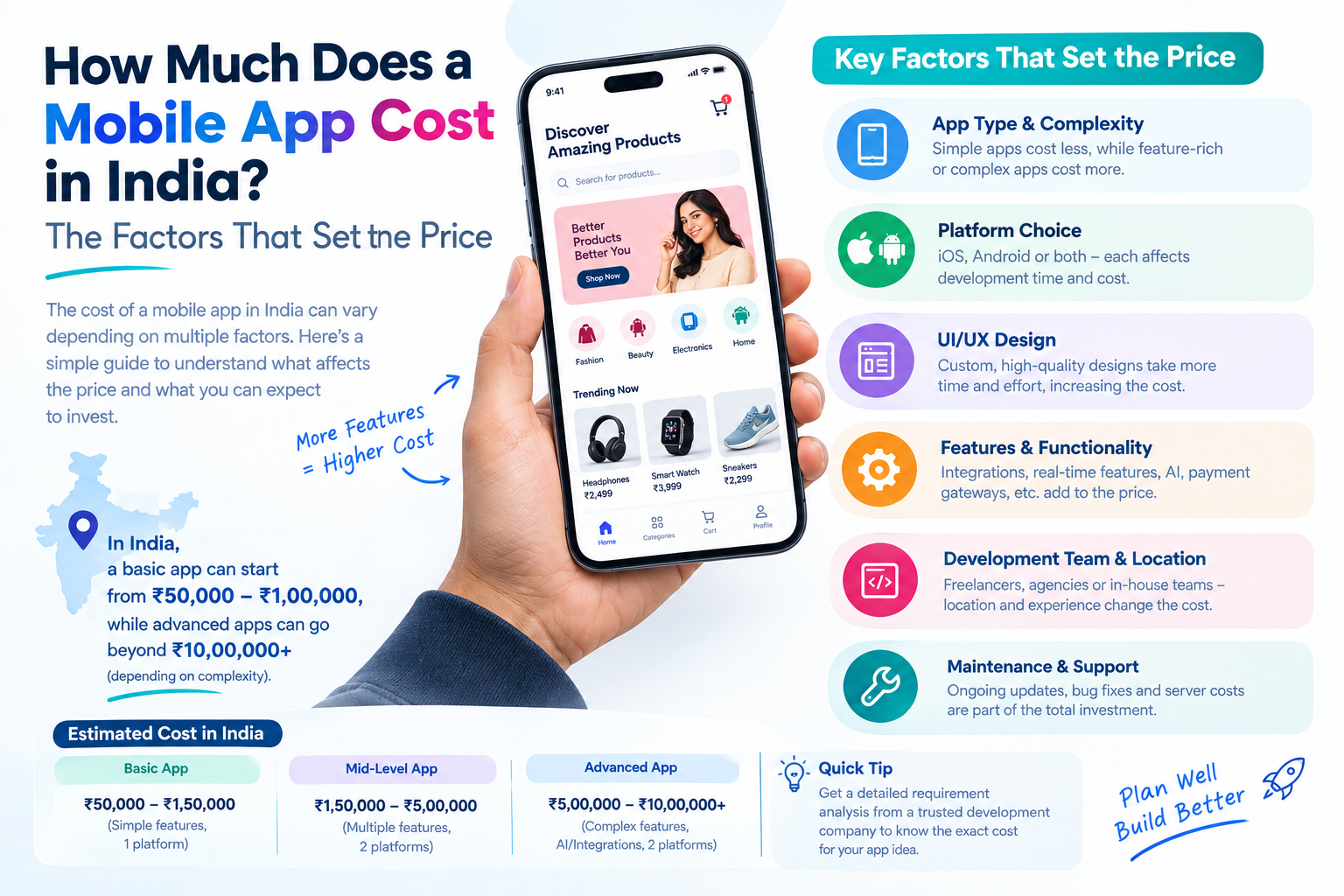
Few questions get more vague answers than "how much does an app cost?" The honest answer is that it depends, and the useful answer is what it depends on. This guide lists the factors that decide the price of a mobile app, the costs people forget after launch and the questions that give you a quote you can trust.
Key takeaways
- App cost depends on features, design, platforms, backend and integrations, not on the idea alone.
- Cross-platform development can reduce effort when you need both Android and iOS.
- Budget for running costs such as hosting, store accounts, third-party services and maintenance.
- A clear scope and a first version with only must-have features is the best way to control the cost.
Start with the type of app
Apps fall roughly into three levels of complexity. Where yours sits is the biggest single influence on the price.
| Level | What it usually looks like | What adds effort |
|---|---|---|
| Simple app | A few screens, sign-in, content or a catalogue, push notifications | Custom design and number of screens |
| Medium app | User accounts and roles, payments or booking, an admin panel, third-party integrations | Each integration, each user role and the admin tools |
| Complex app | Real-time features such as chat or tracking, multiple user types, large data, advanced security or compliance | Real-time infrastructure, offline sync, scaling and security testing |
Most business apps begin as a simple or medium app and grow. Planning that growth, without building it all at once, is part of good scoping.
The factors that set the cost
- Features and screens: each screen and each behavior has to be designed, built and tested.
- Design: a custom, branded design with animations takes longer than standard components.
- Platforms: Android only, iOS only or both. Cross-platform tools such as Flutter and React Native share most code and can reduce effort when you need both.
- Backend and admin panel: most apps need a server, database and a way for your team to manage users, content and orders. This is real work and is easy to forget.
- Integrations: payments, maps, SMS or email, analytics, CRM or accounting systems each need setting up and testing.
- Real-time and offline features: chat, live tracking and offline use are more demanding than standard screens.
- Security and compliance: apps handling health, financial or personal data need extra protection and review.
- Testing: real devices, many screen sizes and operating system versions take time and are worth the effort.
Native or cross-platform: how the choice affects cost
Native development builds separate apps for Android and iOS. It gives the deepest access to each platform and the best performance for demanding apps, with more effort because there are two codebases.
Cross-platform development builds one app for both. For most business apps it is a sensible way to reach both platforms at a manageable cost and with consistent behavior. Our Azoi case study is an example: one React Native codebase delivered the same experience on Android and iOS, with a Laravel back end behind it.
Choose native when the app needs heavy graphics, advanced hardware features or the very best performance. Choose cross-platform when speed to market and shared maintenance matter more.
Costs that appear after the build
- Store accounts: Google Play charges a one-time registration fee and Apple charges an annual developer fee. Create them in your own company name.
- Hosting and servers: vary with the number of users and the amount of data.
- Third-party services: maps, SMS, push notification and payment services often charge by usage.
- Maintenance: operating systems change every year, so apps need compatibility updates, security fixes and bug fixes.
- Improvements: new features and design changes based on what users tell you.
- Marketing: app store optimization, ads and campaigns to get your first users.
A common rule of thumb is to plan for ongoing maintenance and improvement as a regular budget line, not a surprise. Ask any partner what they offer after launch and how it is priced.
How to keep the cost under control
- Build a first version with only the must-have features, then add more based on real use. Our MVP development guide shows how.
- Use proven services for common features such as login, payments and notifications instead of building them again.
- Choose one platform first if your audience is concentrated, or cross-platform if you need both.
- Finalise the design before development starts. Changes after coding cost much more.
- Keep one point of contact on your side who can make decisions quickly.
- Agree a fixed scope and milestones, and handle new ideas as a separate phase.
Hidden costs to ask about
- Is the admin panel included, or priced separately?
- Who pays for third-party services and licences during development?
- Is app store submission and review support included?
- How many rounds of design changes are included?
- Is testing on real devices included?
- What happens with the source code, the keys and the store accounts at the end?
- Is there a warranty period for bug fixes after launch?
Clear answers here separate a quote you can rely on from one that grows later.
How long does it take to build an app?
Timelines follow the same factors as cost. A simple app can take several weeks, a medium app a few months and a complex app longer, depending on scope, design, integrations and testing. These stages make up the schedule:
- Discovery and planning.
- UX and UI design, including your feedback rounds.
- Development in sprints, with a demo at the end of each.
- Testing on real devices and fixing issues.
- Store submission and review, which you should allow time for.
Delays most often come from late decisions, changing scope and slow feedback, not from the coding itself. Ask your partner for a plan with milestones and demo dates.
Fixed price or time and material?
- Fixed price: the scope and price are agreed before work starts. It gives certainty and suits apps with a clear, written scope.
- Time and material: you pay for the effort used. It gives flexibility and suits projects where requirements will change as you learn.
- Monthly or dedicated team: a team works on your product continuously. It suits live apps that need steady improvement.
Many products start with a fixed-price first version, then move to a monthly arrangement for ongoing development once the app is live. Whatever model you choose, make sure the quote lists what is and is not included.
Examples: two very different apps
ProFlyt is an aircrew scheduling platform with a mobile app and a web platform, so pilots can see the flying schedule in real time and send participation requests. Azoi was a content app with articles, illustrations, audio files and drag-and-drop ordering.
Each app has a different mix of back end, content, real-time updates and user roles, so each needs a different budget. That is why reliable pricing starts with a conversation about your features, not with a rate card.
A quick scoping exercise you can do today
You can narrow your own estimate before speaking to anyone. Take one sheet of paper and list:
- Each user type, such as customer, driver and admin.
- The three to five screens each type needs most.
- The one action that must work perfectly, such as booking, paying or tracking.
- The outside services involved, such as payments, maps or SMS.
- What can wait for version two.
The shorter this list, the lower the first-version effort, and the easier it is for a partner to give you a firm quote. Bring the sheet to your first call.
How to get a reliable quote
To receive comparable quotes, give each company the same information:
- The problem the app solves and who will use it.
- A list of the main screens and features, even as a rough outline.
- Which platforms you want to launch on.
- Examples of apps you like.
- Systems it must connect to.
- Your timeline and a realistic budget range.
At Ucodice we begin with a free consultation, then send a fixed quote and timeline in writing before work starts. Read about our mobile app development services or contact us with your outline. We do not publish rupee figures here, because a number without your requirements would be a guess. For a wider overview of the process, read our guide to mobile app development services.
Frequently asked questions
How much does it cost to build a mobile app in India?
It depends on the features, design, platforms, backend and integrations. A simple app costs less than a complex one with real-time features and several user roles. A written quote based on your feature list gives you a reliable figure.
Is it cheaper to build for Android only?
A single platform can be cheaper than two native apps. If you need both platforms, cross-platform development can reduce the effort by sharing most of the code.
Do I need a backend for my app?
Most apps do. A backend stores data, handles accounts and connects to other systems, and an admin panel lets your team manage content and users. Make sure it is included in the quote.
What does it cost to maintain an app?
Expect ongoing costs for hosting, third-party services, operating system updates, bug fixes and improvements. The amount depends on the size of the app and the support level you choose.
Can I start small and add features later?
Yes, and we recommend it. A focused first version lets you learn from real users before investing in more features.