In this article
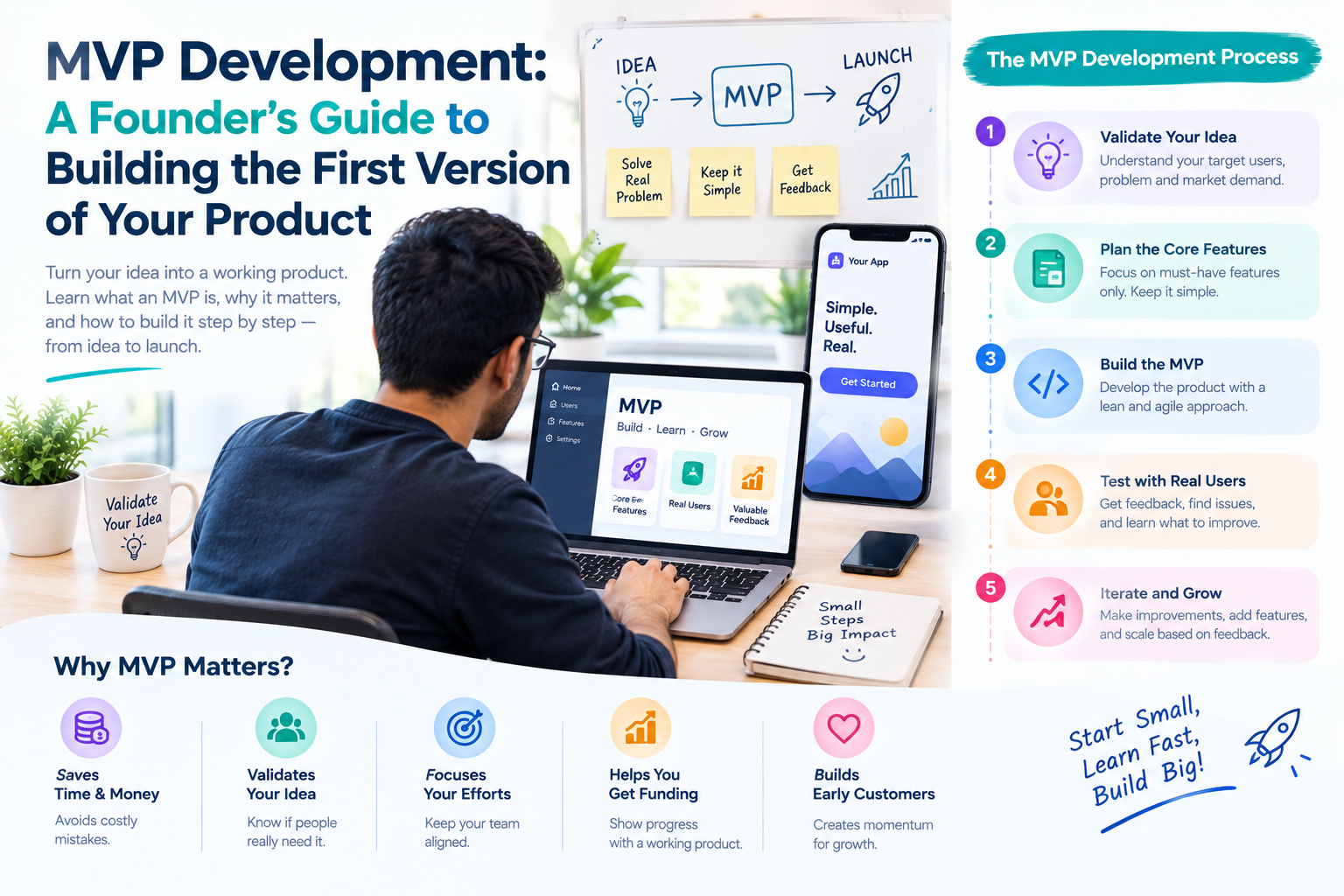
Most startups do not fail because the code was bad. They fail because they built something people did not want, or built too much before finding out. A minimum viable product (MVP) is the way to learn that early and cheaply. This guide walks through what an MVP is, how to decide what goes into it and how to judge the result.
Key takeaways
- An MVP is the smallest product that tests your riskiest assumption with real users, not a cheap copy of the final product.
- Start from one user, one problem and one core action.
- Cut features until the first version is nearly uncomfortable, then stop.
- Decide in advance which numbers will tell you to continue, change direction or stop.
What an MVP is, and what it is not
An MVP is the smallest working version of a product that solves one real problem for real users, so that you can learn whether the idea is worth building further. The word "viable" matters: it must work well enough that people can actually use it and give honest feedback.
- It is not a prototype that only shows screens. People should be able to complete the core task.
- It is not a low-quality product. It does less, but what it does should work.
- It is not the full roadmap in a hurry. Most roadmap items wait until the MVP shows which ones matter.
Think of it as an experiment with a product-shaped body. The question it answers is "Will the right people use this, and will they come back or pay?"
Step 1: Write down the problem, the user and the assumption
- The user: who exactly has this problem? "Small clinics with fewer than five doctors" is better than "healthcare".
- The problem: what do they do today, and what is painful about it?
- The riskiest assumption: what must be true for the business to work, and what are you least sure about? Perhaps users will pay, or will switch from their current tool, or will complete a booking on their phone.
Your MVP exists to test that assumption. If a feature does not help test it, it probably does not belong in the first version.
Step 2: Talk to users before you build
Speak to ten or more people in your target group before writing a line of code. Ask how they handle the problem today, what they have already tried and what it costs them in time or money. Listen for repeated pain, not for compliments on your idea.
Also look for evidence that people act, not only that they agree. A waiting list, a booked call, a paid pilot or a pre-order is stronger proof than a friendly opinion.
Step 3: Choose the features, and cut hard
List every feature you imagine, then sort them into three groups:
- Must have: without it the product cannot do its core job.
- Should have: useful, but users can manage without it at first.
- Later: nice ideas for after you have evidence.
Only the first group goes into the MVP. A helpful test is to describe the core action in one sentence, such as "A customer books a session and pays online". Build the smallest path that makes that sentence true, from sign-up to result.
Where possible, use ready-made services for the parts that are not your difference: login, payments, email and maps. Spend your effort on what makes the product unique.
Step 4: Decide between a web, mobile or SaaS MVP
- Web MVP: reaches users on any device without app store approval. It is usually the fastest and most affordable way to test demand.
- Mobile MVP: the right choice when the product depends on the camera, location, notifications or daily phone habits. Cross-platform tools such as Flutter or React Native let one codebase serve Android and iOS.
- SaaS MVP: a subscription product with accounts, roles and billing logic, built so features and users can be added without a rebuild.
If you are not sure, start with the web version. You can add a mobile app after you know people want the product. Our MVP development services page explains how we help founders choose.
Step 5: Design the simplest good experience
Good design for an MVP is clarity, not decoration. Map the path a user takes, create simple screens and click through them with a few real users before development begins. Fixing a confusing step in a design is far cheaper than fixing it in code.
Keep the first version consistent and uncluttered. Users forgive missing features more easily than a confusing flow.
Step 6: Build in short cycles
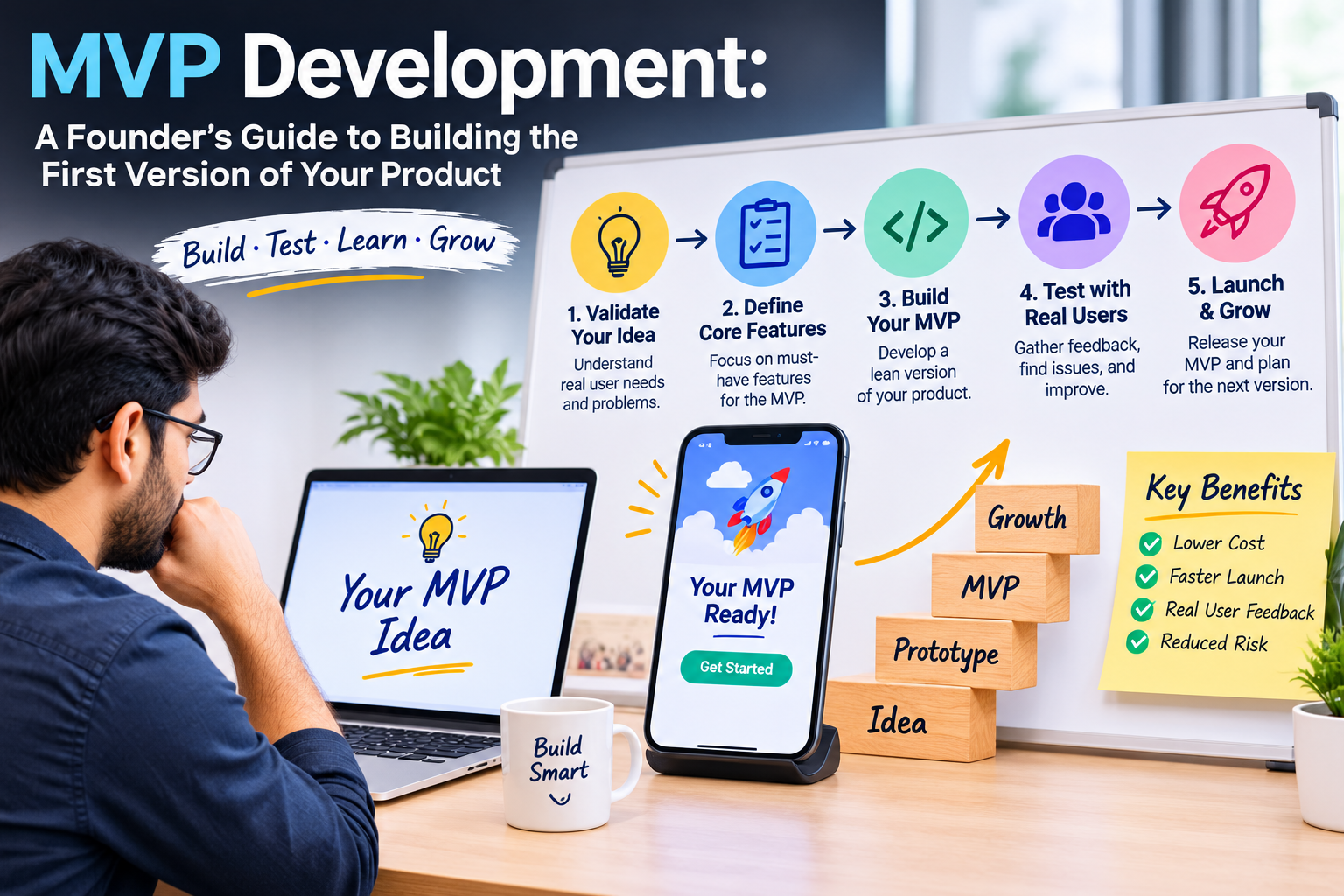
Build the MVP in short sprints, each ending with a working demo. That gives you regular chances to react, change a priority or stop spending on something that is not working.
- Agree the scope and the fixed quote before work starts.
- See a working demo every week.
- Test on real devices and with real data, not only on the developer's machine.
- Plan analytics from the start, so you can measure what users do.
- Release to a small group first, then widen access.
Step 7: Measure what matters
Decide the numbers that will count as success before you launch, so that you are not tempted to explain away weak results afterwards. Common measures include:
- Activation: how many sign-ups complete the core action.
- Retention: how many come back after a week or a month.
- Willingness to pay: how many accept a paid plan or a paid pilot.
- Feedback: what users say they would miss if the product disappeared.
- Cost to acquire a user, compared with what that user is worth.
Then choose one of three paths: continue, change direction or stop. Each is a valid outcome of an MVP, and each saves money compared with a full build.
What affects MVP cost and timeline
An MVP costs less than a full product because it contains less, not because it is built carelessly. These are the factors that decide the effort:
- The number of screens and user roles.
- Integrations with payments, maps, messaging or other systems.
- The amount of custom design.
- Whether it is web, mobile or both.
- Admin tools to manage users and content.
- Security needs, especially with personal or financial data.
Ask for a fixed quote for a clearly written scope, and ask what is deliberately left out. Our guide to how much a mobile app costs in India explains the same factors from the app side.
Common MVP mistakes
- Building for everyone instead of one clear user.
- Adding "just one more feature" until the MVP is a full product.
- Skipping user conversations because the idea feels obvious.
- Choosing technology for fashion instead of fit, which can make later growth harder.
- Having no analytics, so launch results are guesswork.
- Treating the MVP as throwaway code. It should be a sound base that you can keep building on.
- Launching with no plan to reach users.
Examples from our startup projects
Our Demando case study shows a startup product built around a clear core: connecting tech talent and employers through profiles, bidding, chat and offers. Stuffmybags.com shows startup support that began with consultation and a focused launch, followed by SEO, support and steady improvement.
In both, the pattern is the same: begin with a focused first version, then let real use decide what to add. For more on how we approach early-stage work, see our web development for startups page.
A founder checklist before you start building
- I can describe my user and their problem in two sentences.
- I have spoken to at least ten people in that group.
- I can state the riskiest assumption and how the MVP will test it.
- My must-have list fits on one page.
- I know which numbers will tell me to continue, change or stop.
- I have a plan for finding the first users.
- My partner will give me a fixed quote, weekly demos and the source code.
If you can tick most of these, you are ready to build. If not, a free consultation is a good place to work through the gaps. Tell us about your idea and we will help you shape the first version.
Frequently asked questions
How long does it take to build an MVP?
It depends on the scope. A focused MVP typically takes a few weeks to a few months. Working in weekly sprints lets you see progress throughout and adjust as you learn.
How much does an MVP cost?
The cost depends on features, user roles, integrations and design. After a short consultation we help you reduce the first version to its must-haves, then send a fixed quote and timeline before work begins.
Should my MVP be a web app or a mobile app?
Web is usually quicker and cheaper and reaches every device. Mobile suits products that rely on phone features or daily use. We can recommend the best fit for your users and build either.
Can I add features after the MVP launches?
Yes, that is the point. Use what you learn from real users to decide which features to build next. The MVP should be built on a base that can grow.
What happens if the MVP does not work?
You learn it early and at a much lower cost than a full build. You can change direction using what you learned, or stop. Both are better than finding out after spending a full budget.