In this article
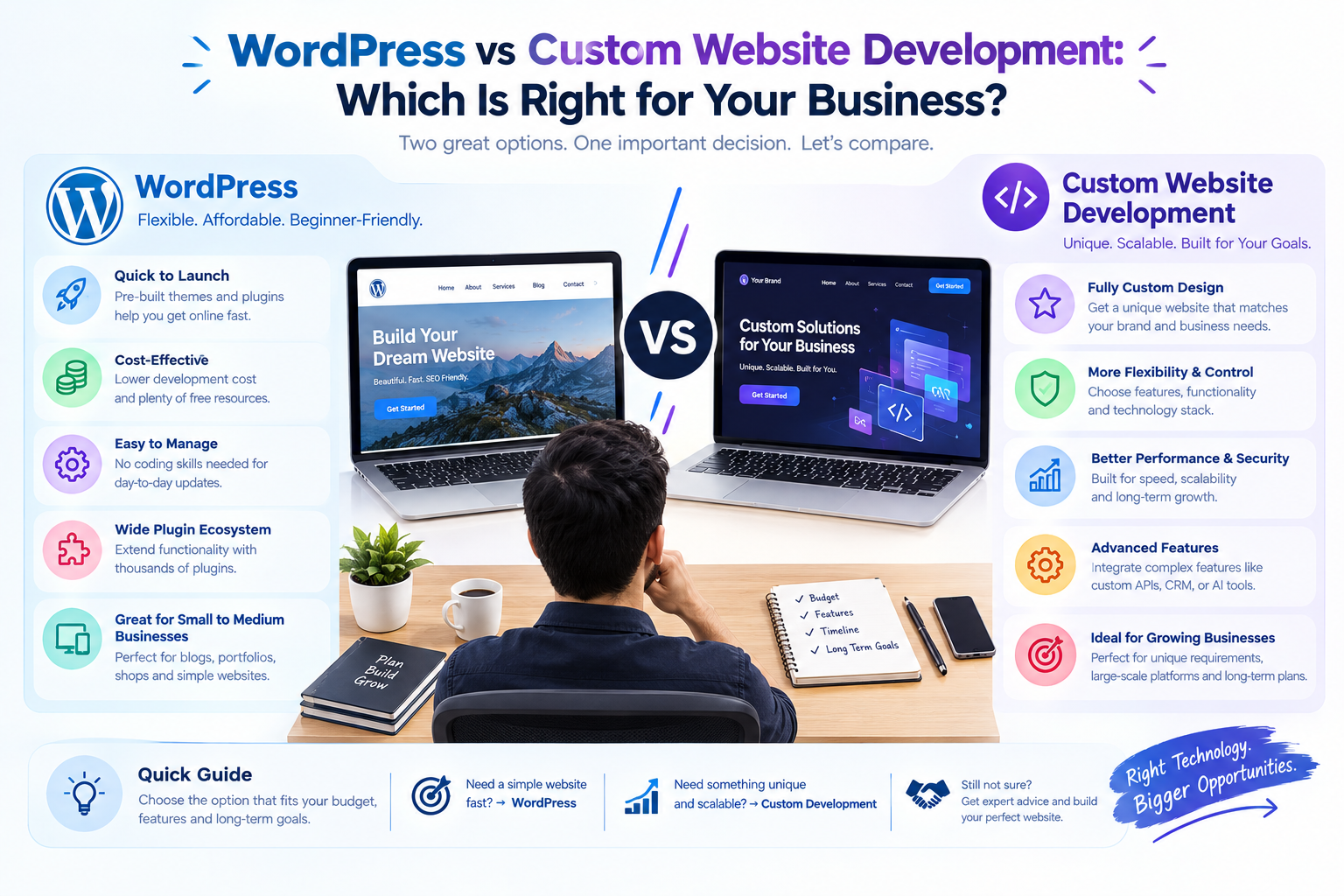
Almost every website project reaches the same question: should we use WordPress, or have the site built from scratch? Neither answer is right for everyone. WordPress gets many businesses online quickly and affordably. Custom development gives you control that a ready-made platform cannot. This guide compares them honestly so you can match the choice to your goals.
Key takeaways
- WordPress suits content-led sites that need to launch quickly and be edited by your own team.
- Custom development suits sites with unusual features, heavy integrations, strict security needs or a product at their core.
- Both can rank well in search. Speed and structure matter more than the platform.
- Many businesses start on WordPress and move to custom work later, so plan for that.
What each approach actually means
- WordPress: a content management system (CMS) with a large library of themes and plugins. You build the site by configuring and extending ready-made parts, and your team edits content through an admin screen.
- Custom development: the site is designed and coded for your requirements using a framework or programming language, such as PHP with CodeIgniter or Laravel, or a JavaScript framework like Angular or React. Every feature is built to your specification.
There is a middle path too. A WordPress site can have custom themes and custom plugins written for it, which gives you the editing comfort of a CMS with features that suit your business.
Side-by-side comparison
| Factor | WordPress | Custom development |
|---|---|---|
| Starting cost | Generally lower, because themes and plugins already exist | Generally higher, because features are designed and built from scratch |
| Time to launch | Faster for standard sites | Longer, because design and build start from a blank page |
| Design flexibility | Wide, but bounded by the theme and plugins | Full control over every screen and interaction |
| Unusual features | Often needs custom plugins or workarounds | Built exactly as needed |
| Content editing | Familiar and easy for non-technical teams | Depends on the admin screen built for you |
| SEO | Strong tools available, quality depends on set-up and speed | Fully controllable, but SEO features must be built in |
| Security | Needs regular updates and careful plugin choices | Depends on the quality of the code and how it is maintained |
| Maintenance | Frequent updates for core, themes and plugins | Fewer third-party updates, but you maintain your own code |
| Scaling | Fine for most content sites, can strain with heavy custom logic | Designed around your expected load and features |
Cost and speed
WordPress usually wins on both, for a simple reason: much of the work already exists. A standard business site, blog or brochure site can go live sooner and cost less than the same site built from scratch.
The gap narrows as requirements grow. If you need many plugins to imitate a custom feature, the time spent configuring, testing and patching them can approach the effort of building the feature properly. Always compare the cost of the whole plan, including plugin licences and the effort of keeping everything compatible, not only the first build.
For a wider view of what shapes a website budget, see our guide on how much website development costs in India.
Design and flexibility
A good WordPress theme can look professional and be adapted to your brand. The limit appears when your design or workflow does not fit the theme's structure. Forcing it often means layers of plugins and overrides that make the site heavier and harder to maintain.
Custom development starts from your design. Booking flows, calculators, dashboards, multi-step forms and role-based areas can be designed around how your users actually behave. If your website is a core part of how the business works, rather than a brochure about it, that freedom matters.
SEO: the platform is not the deciding factor
Search engines do not rank a site because it is WordPress or because it is custom. They rank pages that are fast, clear, useful and well structured. Both approaches can do that, and both can do it badly.
- WordPress offers mature SEO tools and plugins, which make titles, descriptions, sitemaps and structured data easy to manage. Too many plugins or a heavy theme can slow the site.
- Custom sites can be very fast and clean, with exactly the markup you want, but SEO features such as sitemaps, redirects and metadata fields must be planned and built.
Whichever you choose, ask your developer how page speed, mobile design, URL structure and analytics will be handled. Our digital marketing team can review any plan from an SEO point of view.
Security and maintenance
WordPress is very widely used, which makes it a common target for automated attacks. That does not make it unsafe. It means the basics must be done every time:
- Keep WordPress core, themes and plugins updated.
- Install only well-maintained plugins from trusted sources and remove the ones you do not use.
- Use strong passwords, two-step login and limited admin accounts.
- Back up regularly and test that backups can be restored.
A custom site has less third-party code to patch, but its security depends entirely on how well it was written and tested, and on someone maintaining it. Neither approach is "set and forget". Whoever builds your site should offer a maintenance plan.
Scalability and performance
Most content sites, blogs and business sites run happily on WordPress with good hosting and caching. When a site must handle complex logic, thousands of simultaneous users or large amounts of custom data, a custom build allows the database, code and hosting to be designed together. A SaaS product, marketplace or portal usually belongs in this group.
Our Lobital case study is an example of a product that is software first and website second, which is why a custom approach fits it.
Ownership and lock-in
Both approaches can give you full ownership, but ask the question explicitly. On WordPress, check who holds the licences for premium themes and plugins and whether they renew yearly. On a custom site, make sure the contract gives you the source code, the design files and the hosting accounts, so you can change partners later without rebuilding.
When WordPress is the better choice
- You need to launch quickly on a limited budget.
- The site is mostly pages, blog posts, services and contact forms.
- Your team wants to edit content without a developer.
- Standard features, such as forms, galleries, SEO tools or a simple store, cover your needs.
- You expect to grow content over time rather than add complex features.
When custom development is the better choice
- The website is a product, portal, marketplace or internal system.
- You need unusual workflows, calculations or role-based areas.
- You must connect deeply with other systems.
- Security or performance requirements are strict.
- You are comparing a pile of plugins with one well-built feature.
- You expect large growth in users, data or features.
Many founders choose a middle route. Launch an MVP or first version with the quickest suitable approach, learn from real users, then rebuild the parts that need it.
A short decision checklist
- What is the main job of the website: inform, sell or run a service?
- Which three features are essential, and does a proven plugin already do them?
- Who will update the site, and how often?
- How much will traffic and data grow in the next two years?
- Who will maintain the site, and is that included in the plan?
- What does the total cost look like over three years, not only at launch?
If you are unsure, talk to us. We build both WordPress-style CMS sites and custom web applications, and will recommend the one that fits, even when it is the simpler option. Our CMS website development guide is a good next read.
Frequently asked questions
Is WordPress good for SEO?
Yes, it has strong SEO tools and can rank well, as long as the site is fast, well structured and has useful content. A heavy theme or too many plugins can hurt speed.
Is a custom website more secure than WordPress?
Not automatically. Custom sites have less third-party code, but security depends on how well the code is written, tested and maintained. WordPress is secure when kept updated and configured carefully.
Is custom development always more expensive?
The starting cost is usually higher, because features are built from scratch. Over time the gap can narrow if a WordPress site needs many plugins and ongoing fixes to behave like a custom one.
Can I move from WordPress to a custom website later?
Yes. Content can be exported and reused, and many businesses start on WordPress and rebuild the parts that outgrow it. Plan the move early so URLs and rankings are preserved.
Which one is better for an online store?
A simple store can run well on a platform such as WooCommerce or Shopify. A marketplace or a store with unusual pricing, subscriptions or integrations may need custom development.